
A mixed bag - Zoterobib, Open Access button new services, The Publishing Trap game

This is a roundup post of some new services , tools and odds and ends that I could not fit into other posts.
DeliverOA , EmbedOA, OAsheet, GetPDF , InstantILL etc - new services from OAbutton
ZoteroBib - A web-based citation generator from Zotero
The Publishing Trap - Game to teach researchers about publishing and open access
The Game of Open Access - Yet another game to teach open access
Though this is an odds and ends post, there is one thing that ties them together.
Most of if not all of these tools are wholly or mostly open in nature, which is handy.
Take ZoteroBib - "it’s built by the team behind Zotero and backed by the same open-source community, you can count on the same expertise and attention to detail that people rely on when they write dissertations and scholarly papers in Zotero."
The two board games The Publish Trap and The Game of Open Access - have creative commons licenses attached,
As for the slew of new services by Open Access Button, look at the tagline on their webpage. It says "Proudly non-profit · open source · library-aligned".
All this is heartening to see.
1. Intergrating open access discovery into workflow of users and libraries - DeliverOA , EmbedOA, OAsheet, GetPDF , InstantILL
I spent most of April 2018, in the United States on two panels CNI 2018 Spring and Computer in Libraries 2018 with librarians and vendors talking about how discovery of open access has reached a tipping point and that intergration of open accss discovery is increasingly being added to systems and workflows.
This is not news to regular readers of my blog post. In May this momentum continues, this time from the Open Access Button.
Just this week they released quite a few interesting tools and services. Some are just variants of what their competitors in the space do or small extensions, some are fairly unique.
EmbedOA - search forms in pages
This basically allows you to embed a search form in a page so that people can search for Open Access copies by title, doi, url or citation.
As this seems targetted to librarians there are even specific instructions on how to embed this into Libguides and indeed libraries have started to do this.
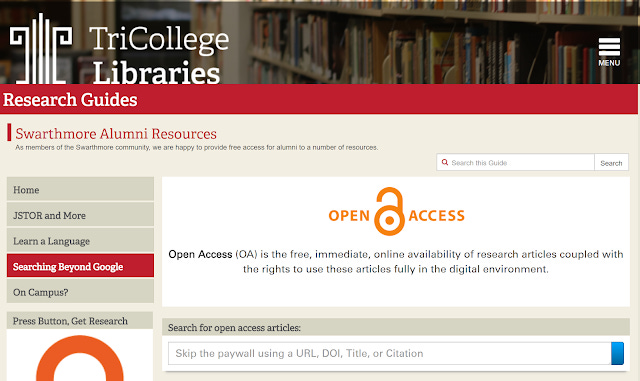
Swarthmore guide on Alumni resource, hat-tip @mutteringtreats
OASheet - upload dois to check OA status
This allows you to upload a list of dois and get back a spreadsheet of data, on how many are open access.
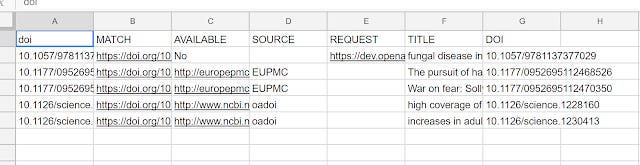
Sample output from OAsheets
Interestingly enough a few weeks ago, Unpaywall launched a similar service with their simple query tool that allows you to check up to 1,000 dois.
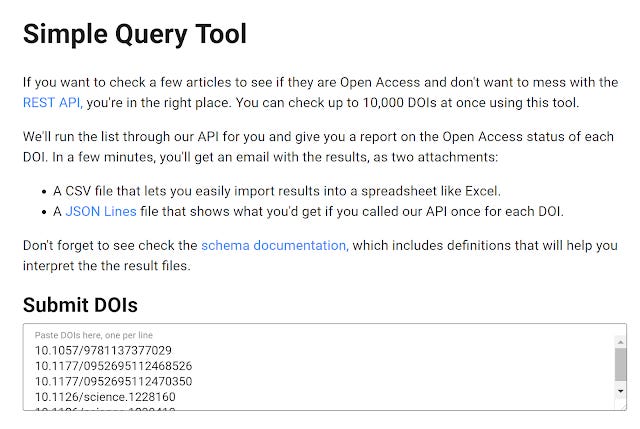
While one can always use the API of both Open Access Button and unpaywall to do this (see old blog post), these simple query forms, makes OA checking capabilities even more accessible.

Output from query checker of unpaywall
Both these tools remind me of Lantern , which also had the capability of uploading csv files and can be seen to be the predecessor of them.
DeliverOA - Plugin to help ILL workers automatically check ILL requests for OA copies
This is where it starts getting interesting. Even when I was a newbie librarian, 10 years also and assigned to work on process improvement of ILL/DDS, staff there already routinely checked for free copies on Google and Google Scholar even though the level of open access was far lower.
DeliverOA aims to help speed this process up by intergrating Open access checking via Open Access Button capacity with common ILL systems including among others
For instance the ILLIAD example, seems to be intergrating a widget into ILLIAD to quickly find free articles.
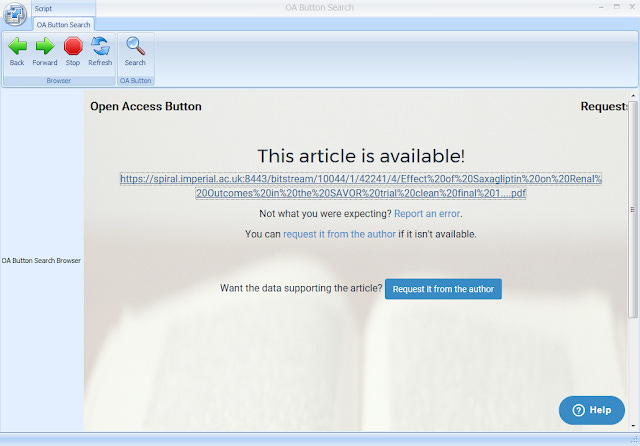
Image from https://openaccessbutton.org/deliveroa#forilliad
By doing so it claims to "Wipe 5% off your ILL budget and delivery times".
InstantILL - Display free and subscribed versions to users in the ILL form
But a even more interesting approach is to offer open access copies further upstream when the user is entering the ILL form before it even reaches the ILL staff.
This seems to be the intent of InstantILL. Described as a "next generation ILL form" , it is going to use newer concepts like autofill/autopopulating (drawing from various sources like Crossref for metadata?) coupled with the ability to instantly display to users - links to subscribed versions or open access versions.
This reminds me of proposals years ago to create a next generation Citation linker or checker that autofills using ajax etc but without the idea of linking to open access.
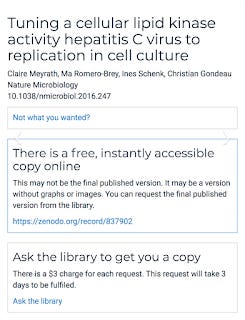
InstantILL form that can automatically display subscribed and free versions
GetPDF - a next generation PDF finding tool
Currently OA finding tools can be classified into two types. Those that focus on only OA material (e.g. Unpaywall, Open Access Button) and those that try to leverage the researcher's institution affiliations to find subscribed versions on top of free versions (e.g. Kopernio, Google Scholar button , Lazy Scholar, Lean library access browser extension).
From the description of GetPDF, it's a tool that will "harness your subscriptions, Open Access, and Interlibrary loan so patrons always have fast, easy, legal access", so it's clearly in the later group.
This isn't out yet but it looks like an extension of the original OA button and will cover finding subscribed copies instead of just free OA copies. From the description, I can see one pretty unique feature - the fact that it intergrates ILL, which I believe none of the others have yet.
Post publication note 21th May 2018, I'm incorrect - Johan Tilstra of Lean library has kindly informed me that for his plugin "if there's no immediate route to a full text, we guide users to a library's ILL or DocDel system."
This is definitely one to watch, particularly since the cost structure is yet unknown though I have hopes that it will be low or even mostly free.
Overall assessment of Open Access Button new tools
Open Access Button has come up with an interesting slew of tool and services, some of which is currently unique in the emerging landscape around open access discovery and there are other interesting projects in the works such as a chat bot.
But besides comparing features, I think we are starting to see differences in approaches between the current players in this emerging space. Ignoring Google Scholar button (which isn't a serious effort by Google) and Lazy Scholar(which is a one man personal project by Phd student- Colby Vorland), we are down to two players who help researchers find both subscribed versions available via affiliations and open access versions.
Kopernio is clearly following a similar playbook to Mendeley , not surprising given one of the founders founded Mendeley. This approach generally involves going after researchers first with a good enough freemium product to generate a strong broad base of users before approaching institutions, in particular libraries to pay for a institutional premium version.
Lean Library on the other hand has a bigger focus on marketing to librarians at institutions to sign up for their institutions before pushing out to users. Adoption is done on an institution level and they have scored some big wins such as Havard University signing up. This is not surprising given that the founder Johan Tilstra had worked at the libraries at University of Utrecht and the idea and prototype which eventually became Lean library access browser extension emerged from there.
There are nuances of course for example Kopernio does hold webinars for librarians and Lean Library is by no means not researcher centric, but it's a interesting way of looking at things.
Where does Open Access button and their offerings such as GetPDF fall into this? Open Access Buttons squarely fall into the later group - aka Librarian centric.
They not only have worked closely with JISC on case studies but their website at the bottom has this little tibit.
"Library-aligned". Case closed.
2. ZoteroBib - free service to generate citations easily without an account or login
I've found that most undergraduates do not use reference managers. Many libraries do not teach undergraduates reference manager based on the idea that they don't benefit that much from learning reference managers. This is because they do not cite a lot until and unless they are doing their final year thesis or projects.
So how do they do their citing? While many do it manually, and perhaps a small percentage will use "Cite it" type tools in databases and discovery services like Summon and Primo, a fair amount will google and stumble upon a site like Citation Machine, Easybib , bibme etc.
You know the type right? Typically you select a type of item you want to cite, add some detail and it will offer it's guesses from it's database of items on what you want to cite, if nothing fits, you must manually fill in various fields and it will construct the citation for you.
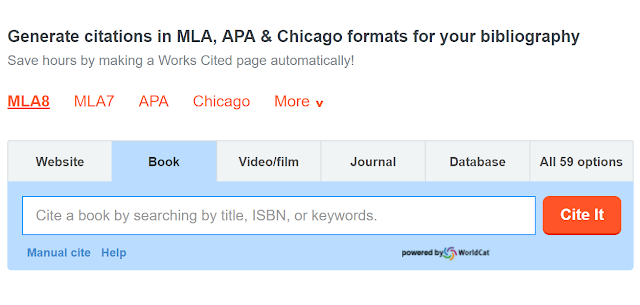
These sites are unfortunately filled with adverts and often try to upsell premium services like services to review the grammer and writing of the paper.
A few libraries have tried to create their own versions but generally it is not worth the effort.
This is why the entry of this new web based service by Zotero, called ZoteroBib is fascinating.
It "is a free service that helps you build a bibliography instantly from any computer or device, without creating an account or installing any software."

It shares many similarity to the commerical alternatives already mentioned, you can first search to see if any items it knows about is what you want to cite, failing that you can do manual entry.
The main strength of Zoterobib over the rest is that it's not just free to use but completely ad-free.
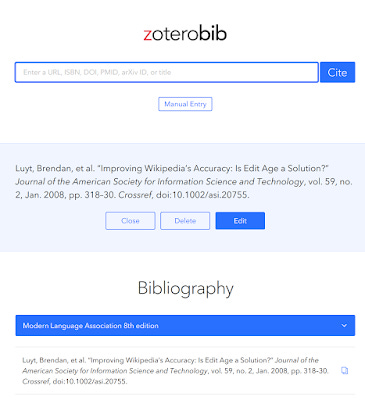
Clean, fast, ad-free interace
I'm not expert enough to comment on whether Zoterobib gives more accurate citations than the other existing alternatives or whether it has a bigger source of known items it can match against but my limited testing sugguests that the search function for title in Zoterobib is more strict than say Citation Machine.
On the plus side Zoterobib allows you to search by URL/PMID/Arxiv. Granted most users particularly undergraduates will not know to use PMID/Arxiv Identifiers.
You can also paste URL and the FAQ states "ZoteroBib can automatically extract bibliographic data from newspaper and magazine articles, library catalogs, journal articles, sites like Amazon and Google Books, and much more."
More testing needs to be done to see how good this feature is. In a way this remains me of the "Cite it" bookmarklet used to get readings into Exlibris's reading list software - Leganto.
Another feature that I think is unique is that any citations you add are designed to be stored in the browser cache and remains there until it is deleted. This allows you to go back to them without an account. You can also copy them to the clipboard in various formats (html, RIS) and even save it to Zotero proper.
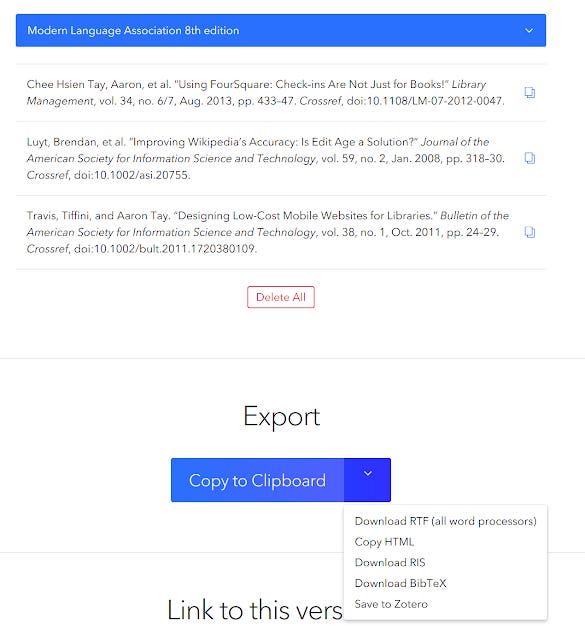
Want to share it with others on their browsers? You can use the Link to this version feature.

3, The Publishing Trap - roleplay as a researcher
The publishing trap is a great boardgame by the UK Copyright Literacy team, designed to teach researchers about the possible impacts of the choices they make during their career. These choices include where and how they publish (open textbook or not , to embargo thesis or not) and more.
I believe you can eventually order the game, or you can use the resources on the website to create your own board - something my collegue did with the help of a student assistant.
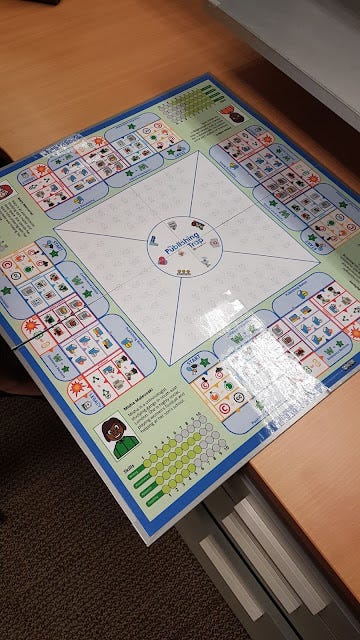
The publishing trap boardgame - made by a collegue
How the game works is you roleplay as a researcher who has just finished his Phd (from one of four areas - Astrophysics, English Literature, Microbiology and criminology.)
As you go through the stages of the game you are faced with various decisions and your choices moderated by your skills ( namely Presentation, Research ,Writing, Teaching) and the roll of a die determine how many impact, knowledge and money tokens you win.
So for example, one of your earlier choices as a newly graduated Phd student is to decide if you want to embargo your thesis or not and you can choose to ask your Phd supervisor for advise or attend a class by a librarian.
Below shows what advice you will get from a PhD supervisor - though the advise is non-binding.
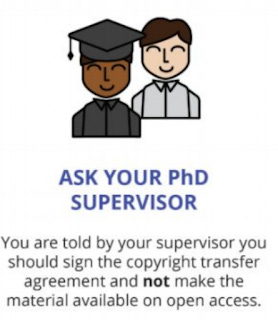
One thing that amuses me of this game is that whenever the player chooses to ask the supervisor, the advice given will be usually the non-closed option, while librarian related answers tend to push towards open.
Choices you make like whether to make your material open access, whether to publish your textbook as a Open Educational resource will have consequences at various points of the game.
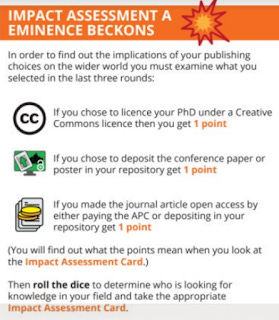
So for example, if you choose to license your PHD under CC license, you gain more points during the impact assessment phase and indirectly will increase impact and knowledge tokens depending on the character taken.
Wildcards and the roll of die helps makes the game somewhat unpredictable even if you play perfecttly.
What I love about this game is it's feel quite real. It's almost like The Game of Life boardgame I remember playing as a child but for researchers and faculty, covering some common and some not so common situations you might face.
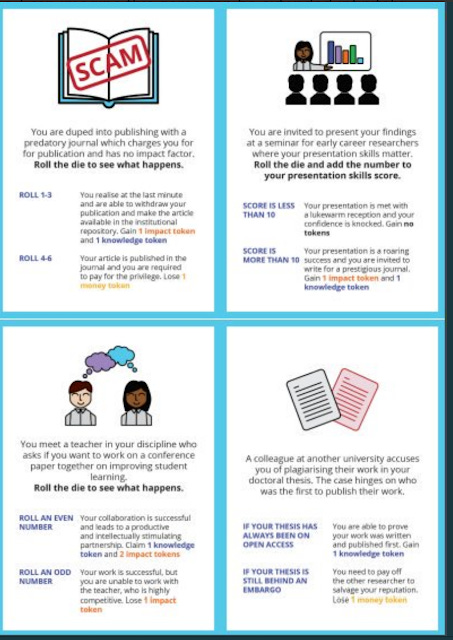
For example you can get accused of plagiarising or get involved in a feud between faculty members.
As you become more senior you can decide whether to publish an academic text or a textbook for students and if the later you can choose to publish it with a commerical publisher or make it open.
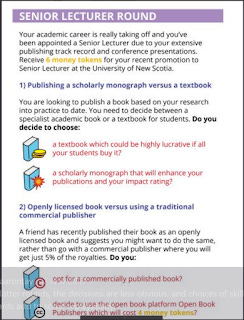
Probably, the one card that caused the most laughter during my playthrough with librarians was the one where you are accused of having a affair with your PHD student!
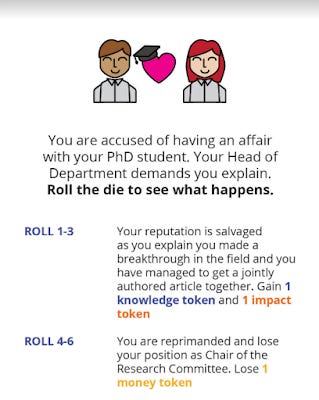
Notice that if you get lucky and roll 1-3 you get away scot free and gain knowledge and impact tokens. Personally I think the phrasing of the card seems to imply that if you manage to get a breakthrough in the field, all is forgiven!
I am very impressed by the variety of situations depicted in the game, but I can imagine this game can be extended even further with a lot more wildcard scenarios.
Eventually you finish the game and the game tells you how the scoring is done based on the tokens you have won.
I won't spoil your fun to tell you how the scoring is done (hint : academics and researchers aren't in it for the money apparently) .
I think this part of the game seems quite arbitary to me and I can see players disagreeing with the scoring criteria, but I guess that's the point? Also it looks to me that the game is designed to be played through once as once you know how the scoring is done , the game loses much of the fun factor.
One thing I think that can improve the game is to have more characters beyond the four areas represented. This can take quite a bit of effort, since you can see how well customized the scenarios are for each of these four areas but with some joint effort, I imagine one can create researchers in other common areas like Finance, Psychology etc.
Currently the game is available under a CC-BY-NC-ND license and to get access to the resources you need to fill in the form here first as the team is seeking feedback. The ND portion of this surprised me since you now can't modify it and publish it, but I imagine there are valid reasons for this at this moment.
Overall this game is a breath of fresh air and to me is a novel way to get researchers to learn in a fun way by simulating their future career.
Can we go further? How about creating a game on the same topic perhaps as a CCG (Collectable Card Game) or as even as a RPG - D20 System anyone?
4. The Game of Open Access
The name of this game evokes the popular book and TV Show - "Game of Thrones" and is a simple board game by by staff from Computing & Library Services at the University of Huddersfield.
The game works like a game of Snake and ladders , you throw a die and follow the instructions when you land on each section.
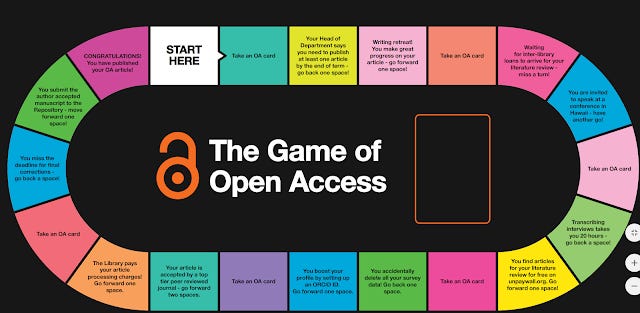
Sections may ask you to move forward or backward various number of squares. Certain squares will direct you to try to answer a question from an OA card and if you are correct you keep it.
Once you reach the end of the game (aka when you are published), you see how many OA cards you have in your hand. The person with the greatest number of cards win.
It's a relatively simpler game compared to the publishing trap and it feels to me to be less immersive, as answering questions from a card with a definite correct answer isn't as true to life. Still it's a great way to encourage researchers to learn as compared to lecturing at them!
Conclusion
All four tools or services I have introduced in this post are open to some extent, so just give them a try!